Principles of a Scalable dbt Project
Author: Stephen Sciortino

Photo by Daniel McCullough on Unsplash
We all love dbt and how it simplifies our analytics workflows.
But over time, dbt projects will sprawl just like any other software project. Sprawl can mean good growth, but it can also mean more errors, more project files, and never ending tech-debt.
dbt projects don’t live in a vacuum either. They run on a database and those systems tend to sprawl as well. The config for dbt is tightly integrated with the config for your warehouse, so a change in one impacts the other. Keeping those in sync can become more difficult as both systems grow.
It’s important to make sure your project is sufficiently scalable before it gets too large and unwieldy to manage. Luckily, there are a few best practices which, when followed carefully, can help you turn the tides against tech debt. In this article, I’ll outline the top three principles that will give you the best fighting chance against sprawl.
Three principles of a scalable dbt project
Developers should not have write-access to production data.
Sources should be isolated from models.
Model folders should map 1:1 with target schemas in the warehouse.
Before diving into each of these, let’s talk about what a bad project looks like.
Think about any project you’ve worked on. Have these ever happened to you?
You run something once against prod but forget to switch your config back to dev and before you know it there’s a happy accident on prod.
You can’t keep track of your model’s config overrides and you don’t know what’s going to happen when you run it.
You accidentally overwrote someone else’s model because they had the same name (or someone overwrites yours!!)
dbt fails due to some unexpected database permission issue and you don’t know how to get it fixed
These situations are all avoidable with the right structure in place.
Let’s walk through how each of the three frameworks can help.
1) Developers should not have write-access to production data
This first idea is less about dbt and more about the environment it lives in. The best way to guarantee an accidental overwrite in prod is by giving developers write access to it. There’s honestly no good reason for doing this, unless you’ve got an anxious CEO breathing down your neck, looking for a hotfix. Even then you should probably still make time to follow the proper process.
So what is that proper process? Here’s the structure I’ve seen work well.
Create two databases for dbt:
Production Database: <Your Company>_Analytics
Development Database: <Your Company>_Analytics_Dev
These environments should mostly speak for themselves, but prod is where your final “living” data assets will exist. All datasets used for analytics, including dashboards with direct warehouse connections, should be sourced from this location. You could consider it the single source of truth, if such a thing even exists.
Dev is where your developers will work and build their dbt models. Each developer should have their own personal set of schemas in the dev environment (ie: stephen_sources__shopify). This can be configured with a dbt macro to override the schema name using the schema param from the user’s dbt profile.
With those databases configured, add or update the following users and roles to support environments:
Only your dbt runner (ie: dbt Cloud) should have write access to production. It will be the only user authorized to write there.
Create a dev role for your developers, which will only allow write access in dev. This role should have read access to prod as well. But no more humans writing to prod!
Workflow steps:
Developers build projects in the dev environment, using their personal custom-named schemas.
Each dbt change requires a PR and each developer should work on their own git branch. (As a developer, it’s very convenient to have your own namespace in the dev environment because you can easily reference queries in your PRs without worrying about the underlying data changing.)
Only after your changes are merged will it show up in prod. If your dbt runner is configured to run prod jobs from the main branch, it will pick up the newly-merged code during its next run.
This tip may seem obvious to many readers, but if you don’t have it in place yet you need it asap. Working off prod is a crisis waiting to happen and the small overhead to establish dev is well worth it.
Other notes about access and environments:
The dev schema structure should resemble prod — including having the same names (except developer prefixes), the same models in those schemas (assuming they’ve been run), etc. Developers should feel comfortable that changes they make in dev will reflect reality on prod.
The dev and prod databases should ideally be separate from the actual raw data itself, which should live in a third database “sources”. I didn’t touch on that here but it’s the ideal third db in a good dbt warehouse setup.
Why teams don’t do this:
Writing to prod is just easier (Who doesn’t like to wield power? It’s thrilling and suspenseful.)
DE overhead — You have to build out the dev db and update everyone’s permissions too.
A solo team may not see the need for this.
This is a “stop-the-bleeding” step that should happen first before anything else, especially if you have a large team and prod issues are common. Trust me when I say that all of your troubleshooting will get exponentially easier after this. The amount of variables that can inflict prod issues will drop off significantly.
2) The Models folder should follow a structure that isolates sources from transformations
This helps significantly with the quality of life for your developers. Following a fixed structure under the models folder can make it much easier to find and ref objects while you’re writing models.
At the top level, you should have at least these two folders: Sources and Marts.
/Models/Sources
Every source used in the project gets its own model in sources.
Break this folder down into subfolders for each system or vendor you receive data from. Each subfolder should have its own source yaml file too (no mono-sourcing allowed). Only add sources that are actually used by the models in that same folder.
Each model file should follow this specific naming structure:
source_{source name}__{name of model}.sql
This one is really helpful for refs because you’re basically fully qualifying the model within the name.
Here’s an example of what the structure should look like:
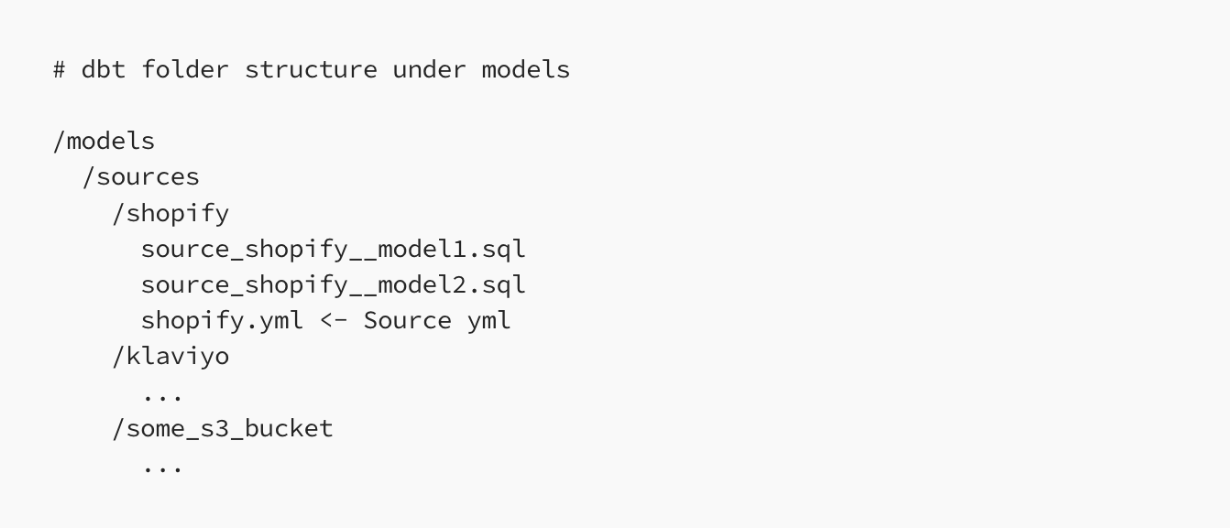
Other notes about the sources folder:
These source models shouldn’t be used for much more than loading data from the source and selecting the relevant fields. I don’t recommend using any joins or CTEs here. You can use this layer to apply simple changes necessary for making the data usable, such as small quality fixes, standardizing/renaming values, and building derived dimension fields.
/Models/Marts
Anything that’s not a source goes into marts. That includes all models used by BI tools or analysts, along with any of the intermediate transformations necessary to prep the data. If you need a place for models that are used as inputs to other models, put them in a subfolder called “intermediate” to keep them logically separated.
Marts and int folder can be laid out like this:
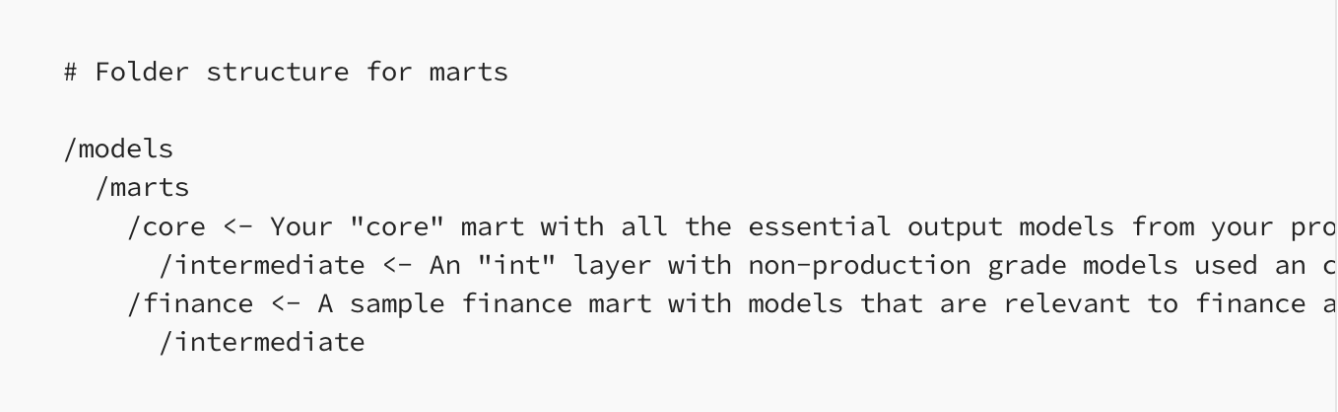
Some notes about the marts folder:
There shouldn’t be a single {{ source() }} function call anywhere in this folder. If your model is calling a source, it should go in the sources folder.
Your db admin should create dedicated roles for each user type (for ex: BI tool, marketing analyst, C-suite ad-hoc queries) with specific read access to those marts.
Why teams don’t do this:
dbt doesn’t enforce much of a structure on its own. The tool’s greatest strength and weakness is its flexibility. dbt Labs itself has put out best-practices for how to design good projects but ultimately it’s up to the team to follow them.
Each developer may have differing opinions about naming conventions. Everyone has a preference about where to store files in a project, and it can be tough to get everyone on the same page especially without a mutually agreed-upon policy.
Having isolated sources and marts will usually increase the size of the project. You’ll have more models (especially for all the sources). Your file names will be longer too. It’s a small price to pay for a more readable project.
Once you adapt this structure it’ll feel like second nature. The overhead of setting it up is made up for by how easy it is to zip around the repo. This is especially useful for anyone who works with multiple dbt projects because you know each one will follow a similar pattern. Context-switching becomes much easier.
3) Model folders should map 1:1 with target schemas in the warehouse
It should be very clear where to find your models after you’ve built them. You can keep this organized by always writing your models to a target schema that maps to the folder name of the model. You can assign entire folders to schemas in your dbt_project.yml file using the schema parameter. For example:
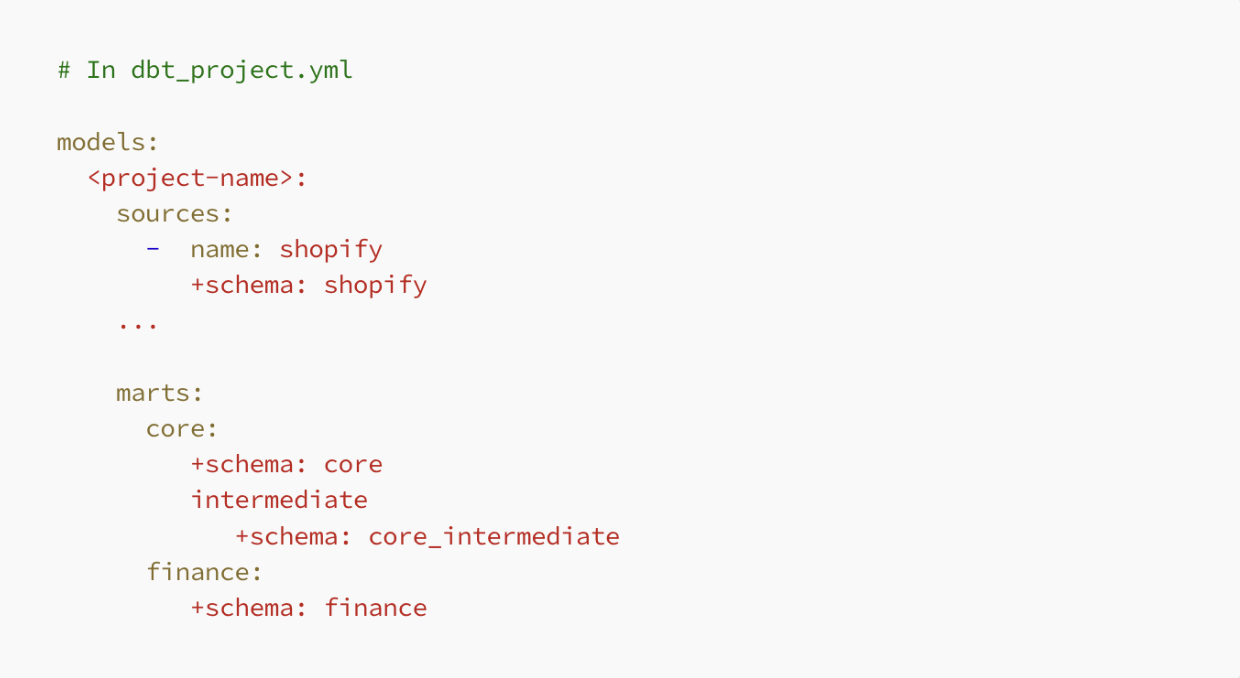
First of all, this helps improve quality of life for the developers. They spend much of their day switching back and forth between dbt and the database. This will make it much easier to find that data quickly.
Next, this makes it possible to assign warehouse permissions at the schema level. This isn’t necessary very often, since most users can generally operate safely with database-level permissions. However two common user groups that benefit from this are analysts and BI service accounts — these users should have very specific permissions to view data, and often it’s useful to lock these down at the schema level.
More notes about folders and schemas:
You can override the default target schema at the model level by adding a config block. Please resist the urge to do this. You will only cause more confusion for anyone trying to follow along with the dbt_project.yml structure.
It’s important to note that all of these schemas should be reserved for dbt use only, and no ad-hoc users should have write-access in them. Also, all permanent analytics code should be brought into the dbt project and should not live somewhere else like a stored procedure. It should find its place in this structure.
Why teams don’t do this:
Similar to the model folder structure, it can be tough to get teams on the same page when personal preferences and style come into play. Having an official team policy helps.
It’s easy to work around. You may have a model that you need in a different schema from the rest of the models in the folder. Instead of making a new folder for it and updating dbt_project.yml, you add a config block “just this once”.
This one is definitely not a priority like the first two, but it does greatly improve the developer experience in the project.
Summary
These ideas are not new or especially exciting. They’ve been debated and iterated on for years by some of the most influential thought leaders in the data space, and now also me. But after seeing them at play in multiple successful projects, I assure you they will have an enormous impact on your project if you’re willing to commit to them.
These principles come from experience. In my last role as a data engineer at Brooklyn Data Co., I implemented these patterns regularly and saw them carried out with great success. I highly encourage you to check out the Brooklyn Data dbt Style Guide which was a major inspiration for this write-up. dbt Labs also has a great series on this in their documentation. Today I see these patterns play out across nearly every project we do at Database Tycoon.
If you’re an analytics engineer and you know there’s something broken about your dbt project but can’t quite put your finger on what it is, this framework might be a good place to start. If you’re a team lead and you want to implement something new like AI or a semantic layer, take the time to set these frameworks up first. You’ll be glad you did it.
Thanks for reading! If you’re considering a change to your dbt project and looking for some extra support, please feel to reach out to us here. We integrate pipelines, platforms, and reporting into one durable analytics foundation built to scale. We’re also happy to just talk data and see where you’re at in your data infrastructure journey!
If you’re interested in learning more about doing a dbt rollout at your company, check out our Free Guide!